Tuesday, August 26, 2008

I am @ DevCon :) - 30,31 August 08 gonna be Thrill n fun !!

devcon_08_01

Welcome to INETA PUG DevCon 2008 - A unique Developer Conference.

PUG DevCon is like a boon for every developer in Pune. DevCon is a conglomeration of speakers and trainers of national repute who take the centre stage to share their knowledge. PUG DevCon not only serves as an amazing platform for interactive sessions but also as a catalyst for learning and sharing new technology, networking opportunities and much much more. This is the fourth consecutive successful year of PUG DevCon.
This year to add some spice to the PUG DevCon, it's not going to be only about distributing gyan but also a funfilled learning process We have come up with interesting quizzes (what is the garbage collector, remember?), power-packed games (darting...? Bull's Eye! ) and some key events in between the sessions. And you know what's the best part about PUG DevCon 2008? YOU DECIDE THE TOPICS AND CONTENT!!!


2 DAYS, 6 TRACKS, 8 SESSIONS BACK2BACK !!!

Attend DevCon and Win exciting prizes like

Windows Vista Ultimate,Visual Studio Team System 2008

Team Suite with

MSDN Premium worth $20,000 and lots more...

Calling all Designers and Developers to be a part of this unique event.

Entry FREE !! Registration Required.

For more information and Registration , Please visit :

Vote for Topic

http://devcon.puneusergroup.org
Hurry up and Register Today !!

For any queries/suggestions,Please contact us at :

devcon2008@puneusergroup.org

Venue: Dewang Mehta Auditorium, Persistent Systems Private Limited, 402, Senapati Bapat Road, Pune - 411016

See you there !!

Vikram.

Wednesday, August 13, 2008

Hosting ASP.NET application from WebDev.WebServer.EXE

Applications like WebMatrix we can say as a revolution for those who were not able to have Server on their machine like Windows XP Home Edition Users were not capable to have IIS on their system.

From Visual Studio2005 or say .NET Framework 2.0, a technique was introduce to host ASP.NET applications without invoking IIS.

I guess my all ASP.NET developer friends must be observing the Balloon which comes up once you from TaskBar saying "ASP.NET Development Server http://loca...." once you press F5 to run the ASP.NET application,like I have shown below

webhost1 

Such thing can be implemented manually from .NET Command Prompt too. Do you remember the following path?, Yes. This is where all important files get stored like vbc,csc,ngen etc. to be name a few.

\windows\Microsoft.NET\Framework\v2.0.50727

Here you can find one utility name as "WebDev.WebServer.EXE" which is standard executable file, just double click on that to run and you will get following screen.

webhost2

This window explains everything how should one go for hosting app via command line, This window gives us the list of parameters and syntax required to proceed ahead.

Next Step is to start .NET Command Prompt as follows :

Click on Start > All Programs > Microsoft Visual Studio 2008 > Visual Studio Tools > Visual Studio 2008 Command Prompt

Go there and Execute the WebDev Command followed by path and parameters like this :

WebDev.WebServer /port:8080 /path:"c:\devcon\devcon" /vpath:"/MyDevCon"

In my case, my application resides at "c:\devcon\devcon" and I want a virtual name to be MyDevCon like we create virtual alias in IIS/ Virtual directory one can say.

webhost3

Once the command is fire successfully, you can see the corresponding notification on Taskbar as shown below :

Webhost4

If you carefully observe the image above, you can see that the alias which I gave on command prompt as "MyDevCon" is now hosted on my localhost and default port which I given as 8080 which is standard for all web applications.

You can right click on that icon in System tray, you will get 3 Options as 

1.Open in Browser : This will open the hosted ASP.NET application in Browser

2. Stop : This will stop this instance of hosting and for rehosting again you need to fire the same command.

3.Show Details : This is pictorial representation in dialog manner to show what is hosted and where like below :

webhost6

By choosing option 1 you can see your application in Default Browser. This is how WebDev.WebServer utility works.

I recommend this for small commercial Web Applications which don't have much of business logic and overall size is low.

This is always helpful when your WebServer have issues.

Vikram.

Monday, July 28, 2008

Deep Zoom with Silverlight 2

Deep Zoom is the thing which is now days people on their toes to know what it is, Deep Zoom we can say part of Technology which comes under arena of Silverlight Technologies.

Here I will demonstrate a quick way to design, develop and deploy DeepZoom Application.

For this you need 4 Things :

1. DeepZoom Composer : can be downloaded from here ,

 http://www.microsoft.com/downloads/details.aspx?familyid=457b17b7-52bf-4bda-87a3-fa8a4673f8bf&displaylang=en

2. Collection of Good Quality and High Resolution Images.

Once you download and Install DeepZoom successfully, just need to run that, The IDE [Well, IDE here is just buzz word I am using, It may not give all features.] is pretty close to the Interface that is provided by Microsoft Expression Blend.

dz1

This gives a formal template to choose the existing project or go for new one, Well point to be noted here that the extension of these projects will be *.dzprj

dz2

Once you all set with the New Project or opening the existing project, well now let's only focus to newly created project. So once you set the new one just see the following screen.

dz3

Now carefully observe the top of the DeepZoom Composer, you will find 3 options below the menu bar as :

1. Import 2. Compose 3. Export

On right and side you can see "Add Image..." option, by clicking on this you will find Normal Open Dialog where you can select one or more Images.

Once you load set of images you can browse through them on right hand side panel, you also have buttons on status bar of DeepZoom Composer to navigate through that collection.

It supports *.tiff,*.tif,*.jpeg,*.png types of images, Once you import those images you can Drag-drop those on work area in middle part, Now choose Second Tab from Top as "Composr" and see this :

dz4

If you observe carefully, Image which are grayed out on right hand side are already on working area, You observe 2 Tabs above "Add Image.." as "All Images" and "Layer View", Layer View is similar to the layers you see in normal Adobe Photoshop, Layer View helps to adjust image layers one above the other and vice versa.

You can very well resize images and also will be able to set all alignment properties for the same from the various alignment and Zooming option given on bottom side toolbar, Also you will observe a small preview window with a white reference box inside that, This is to give you feel of overall how its going to be work. Either now you choose Zoom option or just adjust images and move the mouse wheel, The necessary code will be automatically get generated behind the scenes. After this much of work, Now all you need to do it to deploy this application.

So now you need to take help of "Export" Tab on the top side toolbar, and you will see the following options :

dz5

Now you also see the Output Preview window next to this export template, Well Now carefully observe "Regular Export" tab, where you will find several option, Firstly you need to set some name for the project else it will not allow to move ahead to export. It will show you export location, you can very well change that,Then there are two option, either you Export Images or export as full fledge project, If you wish to export as Collection you can set Image format there.

We are here more focused on "Output Type" option, We are going to export this as Images and Silverlight Project. So our responsibility is over as far as Exporting is concern, Once you click on Export button you will see the following popup kind of template where you will have several options :

dz6 

Export gives you 4 options :

1. Preview in Browser 2. View Image Folder 3. View Project Folder

4. Edit in Expression Blend

"Preview in Browser" will directly render the output in browser and then just matter of moving mouse wheel and DeepZoom will start working.

"View Image Folder" and "View Project Folder" will basically throw you to the actual physical location of the project and image collection.

"Edit in Expression Blend" will allow you to tweak this project in Expression Blend if you want to do some modification especially in design part.

I hope this article will help you to know what is this latest buzz word "Deep Zoom" is all about. Still more to come for DeepZoom, so keep watching this place.

-Vikram.

Monday, July 7, 2008

I am talking on Silverlight 2.0 on next weekend.

We do have Monthly Community Day where we all come together and share our thoughts and practical experiences on latest technology, so for July, PUG have Silverlight, Expression Blend and Managed Applications on Windows Mobile, Here are details below for same : Its totally free for all, So those who are in Pune, Its going to be good discussion for them.

PUG Community Day - 19 July 2008

presents

Developing Silverlight 2.0 based Web Applications

Speaker :

Mr. Vikram Pendse.

Microsoft MVP [ ASP.NET ]

Time : 3:00 to 4:00 PM

Lap Around Expression Blend

Speaker :

Pradnya Naik

Microsoft SP, Pune

Time : 4:10 to 5:10 PM

Managed Application Development in Windows Mobile

Speaker :

Mayur Tendulkar

Microsoft Tech. Intern,MSP Lead, Pune

Time : 4:10 to 5:10 PM

Date: Saturday, 19 th July 2008

- Venue -

Microsoft Corporation (I) Pvt. Ltd.
202, 2nd Floor, Phoenix,
Bund Garden Rd.,
Opp. Pune Residency Club
Pune Maharashtra 411001
India

Vikram.

Thursday, July 3, 2008

I am Microsoft MVP now..

Happy moments :)

On July 1 2008, I got mail from Microsoft that I have won the Microsoft Most Valuable Professional Award for ASP/ASP.NET for Year 2008 and ahead.

logoMVP

This I won because of my online and offline activities.

I am part of one of the leading .NET user group in India called as Pune User Group (PUG)..you can find that here

http://groups.msn.com/puneusergroup

This is the most amazing platform for all people who are passionate about Microsoft Technologies, its immaterial who they are..they might be college students, developers, testers, IT Pros or seniors in IT..The group is for all and all equally contribute to it to make it better and better day by day.

I am very much thankful to following people who help me a lot and given me guidance everytime to get this MVP credentials :

1. Mahesh Mitkari [PUG Manager, MVP]

2. Dhaval Faria [MVP]

3. Sarang Datye [Consultant, Microsoft India.]

4. Mayur Tendulkar [Tech.Intern,MSP Lead,Microsoft India.]

and thanks to all my friends and people who always given me encouragement for my all activities.

Vikram.

Tuesday, June 24, 2008

My Blog on iPhone.

I am regular reader of http://www.asp.net site, If I am in office, I don't miss to read this site while having a cup of Tea.

Today I found an interesting article there about developing ASP.NET AJAX applications for iPhone which is one of the hot selling phone all over the world. I am frankly speaking, a Big HTC Phone fan.I still feel that HTC Diamond which is the latest release has edge over Apple iPhone, still I am not a better judge for this.

I thought I should share this nice portal URL with you people,especially who are crazy for iPhone, so go to following URL

http://www.testiphone.com

It is a online web based iPhone simulator which you can use for regular browsing of web pages, it gives feel like you are surfing Internet on iPhone, It do allow to rotate that Handset into 90 Degrees too for exact simulation.

So I directly tested my blog on that, here are some of the screens :

ip1

Vix1

So..got the feel of my blog on iPhone??

Well, This portal also contains some good information about iPhone simulation, As far as ASP.NET AJAX applications are concerned, There is not yet any separate SDK i found especially for .NET integration.

Its fun to test this simulator, hope you will like it,especially iPhone fans.

I am bit surprise..I have not came across such web based simulator for HTC phone.

Vikram.

Sunday, June 15, 2008

Silverlight 2.0 Beta 1 : Lap Around with Install Experience.

Silverlight is back in action with its latest release as "Silverlight 2.0", making mark all over now in Web developers communities around the world.

We all know from previous versions of Silverlight that it depends on Silverlight runtime, I don't know why Microsoft has not put that as integral part of .NET 3.0/3.5 Framework itself, If Ajax can be built in feature then why we still need silverlight runtime to download separately.

Well,Lets not bother much about this, You need to have Silverlight SDK to be download so as to design and develop Silverlight based applications. This can be downloaded from Microsoft website.

Once you install a file name as "Silverlight_chainer.exe" setup file, Then you can say you are ready for Silverlight experience.

sl3

You can find Silverlight Template with two options as "Silverlight Application" and "Silverlight Class Library" , You choose application to proceed, well do notice that you will not find those option if you go for Multitargeting option to .NET 2.0 and 3.0, please make note of this that you select right .NET Framework.

Once you click on OK, you will get following screen :
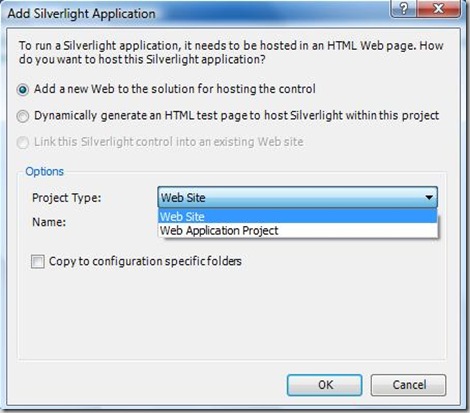
sl4

Now, its quite confusing for newbies, so if you are not familiar with those two options, I think their text is quite self explanatory.

One will be just sample host and another will be with application and host. Go for WebSite option and click on OK.

Now check the Toolbox and Solution Window one by one:
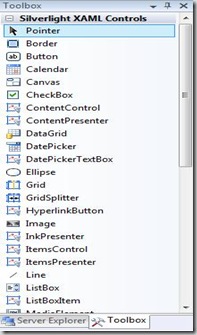
sl5 

Big Surprise..I ask many people but I don't got any clue yet, why those intrinsic controls of Silverlight XAML Controls on Toolbox cannot be Drag and Drop on Design window but it can get invoke in XAML Code window..I don't know whether it won't happen at all or its a BUG !

Now check Solution Explorer Window :
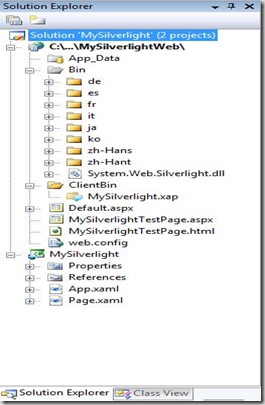
sl8

As you can see that since we have chose "WebSite" option while creating new Silverlight application, due to that choice we have several things here, notice the System.Web.Silverlight.dll , Notice MySilverlight.xap file. This .xap is nothing but manifest and contains all necessary information to run application.

We also have 2 test pages as "MySilverlightTestPage.aspx" and "MySilverlightTestPage.html".

Upto this we took lap around Silverlight 2.0 Beta 1, Now lets see some more information on customizing the Install Experience of Silverlight.

Normally you see the following screen when you don't have Silverlight runtime :

sl1

You can very well customize this message and you can also apply styles to it to make it more friendly and generous to user.

If you see the code of "MySilverlightTestPage.html" as :

<objectdata="data:application/x-silverlight," type="application/x-silverlight-2-b2" width="100%" height="100%">

<param name="source" value="ClientBin/MySilverlight.xap"/>
<
param name="onerror" value="onSilverlightError" />
<
param name="background" value="white" />

<a href="http://go.microsoft.com/fwlink/?LinkID=115261" style="text-decoration: none;">

<img src="http://go.microsoft.com/fwlink/?LinkId=108181" alt="Get Microsoft Silverlight" style="border-style: none"/>
</
a>
</
object>

Yes, .xap file is there under ClientBin, So is Silverlight.js file gone?, Answer is no, its still under framework folder and you can very well invoke that too.

In this object tag, I can wrap this one with <div> and I can create my own version of install experience to make it more user friendly and customizable.

Now its turn for "MySilverlightTestPage.aspx", well now you have <asp:Silverlight> control for your help, It has <PluginNotInstalledTemplate> tag to display error message, I have customize this to show you how it looks like.

<div style="height:100%;">
<
asp:Silverlight ID="err"runat="server" > <PluginNotInstalledTemplate>
   <
divstyle="vertical-align:top;"align="center">
 
Explore.NET with Vikram Pendse<br />
  
Blog is Silverlight enabled, Please install Silverlight by clicking on image below<br /><b>its FREE Download..so Download it and exprience the richness with Silverlight</b><br />
</
PluginNotInstalledTemplate>
</
asp:Silverlight>
<
asp:Silverlight ID="Xaml1"runat="server"Source="~/ClientBin/MySilverlight.xap"MinimumVersion="2.0.30523"Width="100%"Height="100%" />
</
div>

This will customize the typical Traditional looking error message to friendly and user defined one.It will look like as below :

sl7

This is how you can control totally the Install Experience of Silverlight using Silverlight 2.0 Beta 1.

Well, Twist in this is that, if you have installed Silverlight then how will you get this screen?..any guesses?..simple simple simple..

Just Open Internet Explorer Click on "Tools"-->"Manage Add-ons"-->"Enable or Disable Add-ons", This will show you a window with variety of options, you just need to Click on Microsoft Silverlight and make it Disable so as to experience this customize Silverlight Install Experience which we have created above.
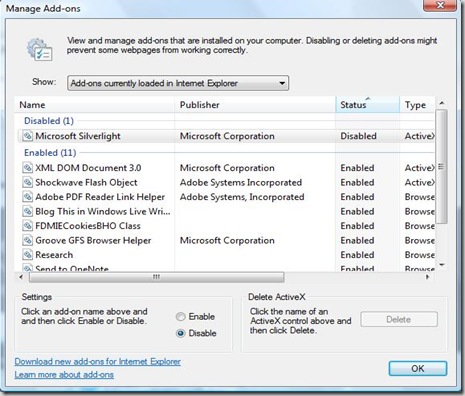
sl2

That's it!! ..done with it..I will be back soon with more actual Silverlight Applications in form of articles here which will be thrill to program.

-Vikram.